Cooler Xtreme : Casing
: Lian Li PC-70 Aluminium Full Tower Computer Case
Lian Li PC-70 Aluminium Full Tower
Computer Case
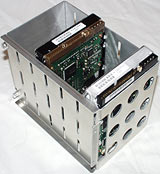
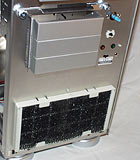
The reason why
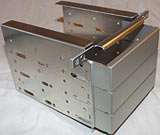
the bottom bays look odd is that the drives mount in them sideways. Undo
two thumbscrews and you can remove the cage completely...
...and install your drives.
It's things like these that
become annoying in cheaper cases; there are bays that are sorta-kinda the
right width to fit a drive of a given size, but when you've screwed in a
couple of devices, the poorly fabricated drive cradle's sides are pinched
in a bit and you can't jam more drives in until you loosen off the screws.
This doesn't happen with the
PC-70. All drives fit snugly before you tighten the screws, and tightening
one thing doesn't jam another.
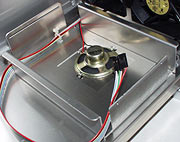
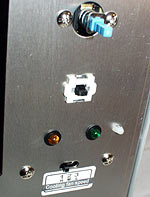
With the bottom drive bays removed,
you can see the downward-facing speaker (it's got some holes in the bottom
of the case to beep through) and the case light and switch connector leads.
Various other Lian Li cases
have slide-out motherboard trays, and a plug and socket in the middle of
the connector leads, so you don't have to individually unplug and replug
all of the fiddly little motherboard connectors.
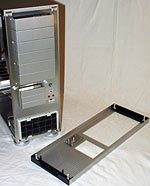
Oddly, the PC-70 doesn't have
a slide-out tray, and so doesn't have the two-part connector lead loom,
despite being a big case. Big cases are the ones most likely to have this
convenience feature.
The reasoning behind this is
simple enough; with its generous depth, the PC-70 doesn't need a slide-out
motherboard tray much, as things shouldn't get in the way of other things.
You only have to slide out the motherboard when there's a forest of cables
and drive backs and such in between you and, say, the RAM slots; in the
PC-70, it should be quite easy to marshal all of that stuff out of the way.
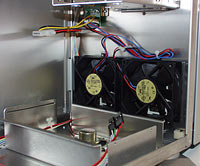
Removing the bottom drive bays
also lets you see the two front fans.
Twin speed-controllable front
fans are standard, as with every other Lian Li case. As usual, they're three-wire
units, but the speed controller they plug into has an ordinary four pin
Molex connector hanging off it; unless you unplug the fans from the speed
controller and plug them into the motherboard directly, you can't monitor
their speed.
Since few motherboards have
enough fan headers to run four speed-reporting case fans and at least one
more on the CPU cooler, though, this isn't a big deal.
As with the other Lian Li cases,
you get at the fan speed control switch by removing the front panel.
The older PC-60's front panel
clips in place with some slightly fragile latches, and it can only be safely
removed once you've got the sides off the case. The PC-70's front panel
uses nifty speaker-grille type plastic spring clips, which hold it firmly
and also make it easy to remove.
The bottom of the case's front
looks the same as the PC-60. Removable open-cell foam filter over the fans,
removable 3.5 inch drive cradle held in place with three more thumbscrews,
fan speed control switch.
As with the other Lian Li cases,
the speed control lets you run your front fans at full power, at about two-thirds
power, or at about two-fifths power. The lower power settings are great
if you've only got a couple of lower-RPM 3.5 inch drives in the bottom mount.
Undo the middle-bay thumbscrews
and it's easy to remove the cradle, for drive installation.
All of the bay covers are made
of sharply bent aluminium, as in previous Lian Li cases. But they're now
retained only with neatly stamped nubbins that pop into holes in the case
chassis; there are no screws at all. The covers, like everything else, neither
seize nor rattle.
I've removed two of the 5.25
inch bay covers, here, and hooked one of the removed ones over the ones
that remain so you can see the retaining nubbins.
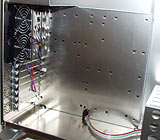
The motherboard area. Every
one of these little square holes can have a screw receiver popped into it,
giving you the ability to install pretty much any current mainboard. Including
P4 boards with the extra mount points for humungous CPU coolers.
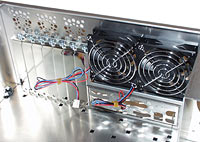
The standard-issue rear fans.
The three 40mm fan mounts below
the rear fans are, like the ones in the PC-31, fine if you just leave them
empty. 40mm fans don't move a lot of air.
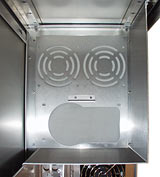
This picture, taken through
the 5.25 inch bays, shows the PSU and extra fan mount point from the inside.
Unusually, the PC-70 has a metal
enclosure around the PSU area. This means that PSUs that have a bottom vent
might not work properly if you mount them here; there'll be very little
clearance between the grille on the bottom of the PSU and the bottom of
the mounting box.
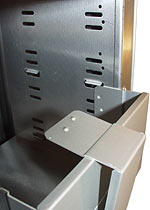
You can install the PSU mounting
plate either way up, though; there's a little bracket to help support the
PSU if the plate's inverted. In this orientation, a bottom vent will point
upwards and get a bit more clearance between it and the top of the case.
In a conventional layout, bottom-vent
PSUs can be a good thing; they suck air straight from the CPU area. But
the PC-70's got that big mounting box in the way, and it's riveted in place
so cutting a vent hole in it will be a bit annoying. There's nothing stopping
you from drilling out the pop rivets and replacing them with bolts later,
of course.
On the plus side, if your PSU
doesn't have a vent in an awkward place - and most of them don't - the mounting
box is otherwise absolutely ideal for fancy case-mod adventures; there's
room for a compact water cooling radiator in front of the extra rear fan
mounts, for instance. And it wouldn't be hard to hack in a whole second
PSU mount for your Peltiers, preposterous fans and so on, either.
And, of course, you really don't
need the PSU fan to help you with ventilation when you've already got four
80mm fans mounted as standard.
Overall
The PC-70 costs more than twice
as much as various decent full tower cases - which come with 300 watt power
supplies, which are $RM 200 items by themselves. Heck, put a PSU in this
thing and you're paying more for it than you'll currently pay for a 1.1GHz
Athlon.
But never mind the price. Feel
the quality.
If you're going to spend a few
thousand bucks on your super-PC, or invest many hours of your time in customising
it, or if you're seriously considering buying a swish-looking brand name
computer to go in your featured-in-interior-design-magazines office, then
paying big bucks for a case that's not only sharp looking but also very
nicely made is not nutty.
As always, the major issue for
a lot of buyers is just going to be getting hold of one of these things.
Australian buyers can just go to Aus PC Market (by, I remind you, clicking
here...),
but there's no point doing that if you're in some other country.
Various custom-case places say
they stock them, but they won't necessarily have the new-model PC-70, and
lots of these small outfits are just one guy in a garage and may or may
not have any stock of anything. If you're in the States, JCL is a real company
that has Lian Li products, and Leadman Electronics distribute them as well.
In Canada, Tweakbox may get some PC-70s in. Elsewhere, I still don't know.
You sure don't want to pay for shipping from Australia.
As I've said before, though;
if someone local stocks 'em, buy one, you'll like it.
Don't go spending big bucks
on a PC-70 if the computer you want to build will fit perfectly well in
a PC-60, though. This one's for serious drive collectors.